
Mago Cast Licensed per room
The live meeting, on every screen in the room.
And nowhere else.
In a large room the display is far away. Mago Cast takes what is on the room screen and relays it live, over your own network, to the seat in front of each person.
The room
The screen at the far end, repeated close to the eyes.
What the room is showing appears on the relay monitors along the walls and on the tablet in front of each person, in real time, over your own network.
- Every seat is the front row.The room's picture is repeated on every tablet and relay panel at the table, live. Pinch to zoom when the detail is small.
- Nothing to install to watch.Viewers open a browser and join. Native Android and iOS apps are there when you prefer them.
- Snapshot and annotate.Freeze what is on screen, mark it up, and leave with a PDF of your own notes.
- It stays on your network.The stream is broadcast on the local network. No cloud service sits in the middle.
Why it matters
There is nothing outside the room to secure, because nothing goes there.
Most privacy features are promises about how someone else will treat your data. This is a different kind of guarantee: the data never reaches them.
- The stream stays on your LAN.Carried over WebRTC's encrypted transport, never published outside the meeting.
- Enabled per meeting.Capture and annotation exist only when an administrator turns them on for that session.
- Nothing to delete afterwards.No copy was ever made anywhere you cannot reach.
How it works
One machine in the room does all of it.
If a computer already drives your display, it already has everything Mago Cast needs.
01
It captures
The room kit's HDMI output goes into a capture card, or the machine simply shares its own screen. Audio optional.
02
It broadcasts
The picture is sent over the local network to relay panels, tablets and browsers, with no internet required.
03
It understands
The same machine turns the session into a transcript and a recap, and keeps them next to the recording.
What you get
The live picture, and what the session leaves behind.
Live relay
The room screen on every tablet, panel and browser in the building, in real time.
Relay screens
Fixed displays configured once, including Samsung VXT panels that take the stream over IP.
Live captions
Text under the picture while the meeting is still running.
Snapshot & annotate
Freeze what is on screen, mark it up, and save the set as a PDF at the end.
Meeting recap
The session summarized into decisions and follow-ups, generated on the machine in the room.
Viewer apps
Browser, Android and iOS. The apps remember the room, reconnect on their own and keep the screen awake.
License
One key, one room.
Mago Cast is licensed per room. You receive an activation key when you buy it, and you enter it once on the machine that drives the room. From that point the room broadcasts on your own network, with or without an internet connection.
What you need to start
Mago Cast sits alongside the room kit you already own. It does not replace it.
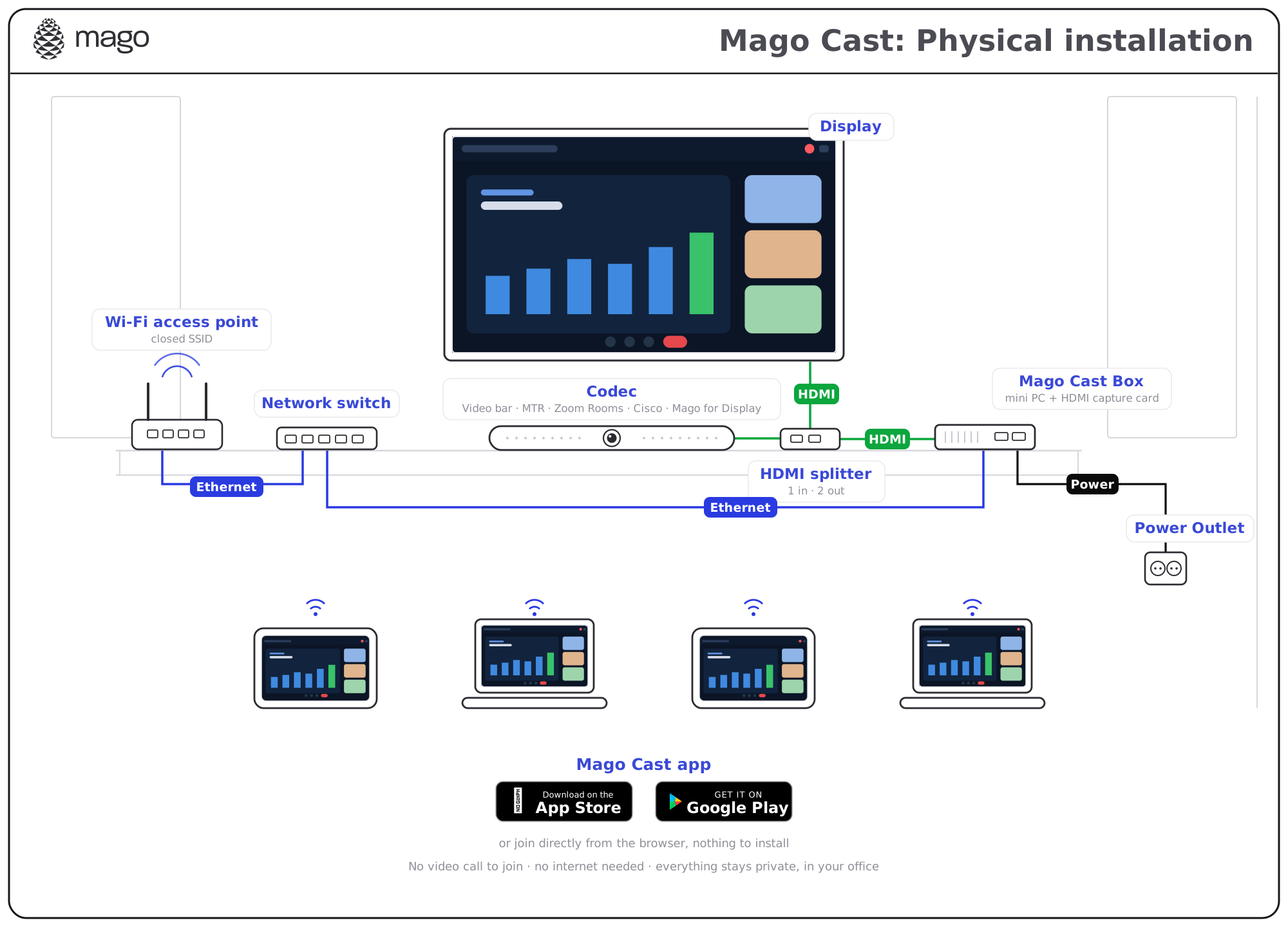
- 01The room kit output, through an HDMI splitter when the signal is already in use
- 02A capture card on that output
- 03A compute unit: Windows, macOS or Android
- 04A local network, wired or Wi-Fi, shared with the viewers
Works with what you already use
It takes the room kit's picture. It does not plug into the platform.
Nothing to certify, nothing to license on the platform side, and nothing that breaks when your room kit updates.
Microsoft Teams RoomsZoom RoomsCisco Webex Room KitGoogle Meet room systemsWindows 11macOSAndroidSamsung VXT
FrequentlyAskedQuestions
Put the screen in front of everyone.
Book a demo in your own room, on the hardware you already have, and see the far wall arrive on the table.