Mago Whiteboard, free

The whiteboard your interactive screen was missing.

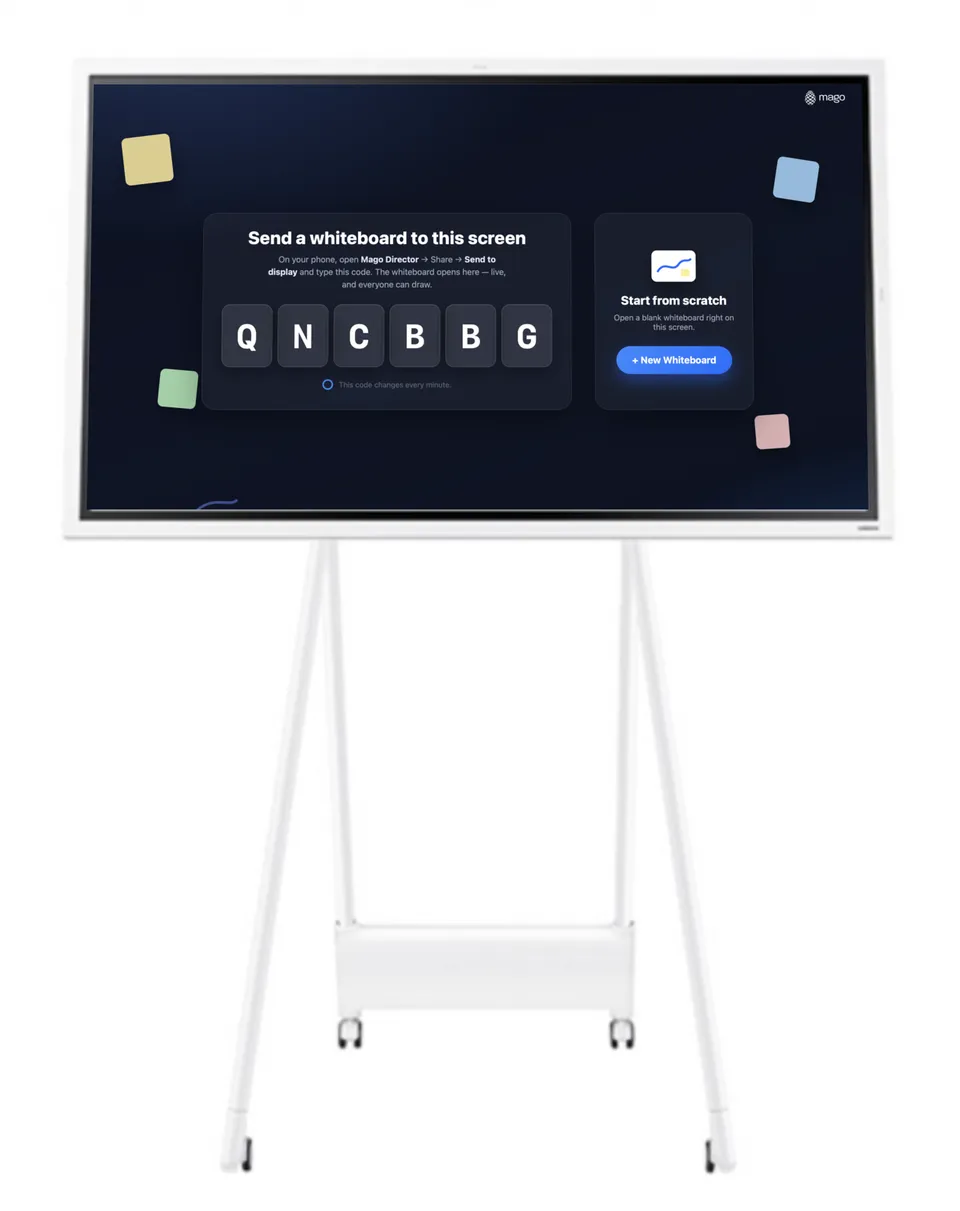
Open board.mago.io/displays on the screen in the room and it is ready: a code appears, phones and laptops join it, and everyone draws on the same board. It is free, and nobody has to register: not the room, not the guests.

  • Runs on the interactive screen you already have, with nothing to install
  • No account, no sign-up: the code on screen is the whole setup
  • Guests join from a link or by email, on any device
An interactive display on a wheeled stand, its screen showing the Mago Whiteboard start screen: a six-letter code to send a board to it, and a button to open a blank whiteboard

Your boards, on your own server.

Where the work cannot leave the building, the same whiteboard is available as a paid private server: installed on-premise, self-hosted, or in your own private cloud. Same product, your infrastructure.

Magic features

What lands on the board is only the beginning.

Photograph a real board, sketch by hand, drop in a picture, search the web for an image or a video, then let the board do the tidying. Cut-outs and backgrounds are worked out on the device itself. The AI features ask a model, and what comes back arrives as strokes, as a photo or as text you are free to keep or throw away.

AI drawing

Say it, and the board draws it.

Describe a subject and it arrives as strokes, drawn one after another, in the colours you asked for. They are real pen strokes and not a picture dropped on top: rub a line out, change its colour, pull the drawing apart and carry on by hand. Ask for a pencil drawing instead and it comes back in fine graphite lines.

AI photo

Tell the photo what to change.

Point at any photo on the board and say what should be different: a blue sky instead of a grey one, the crowd behind the subject gone, the whole picture turned into a pastel pencil drawing. The new version lands beside the original, so what you had is still there. Ask for a picture you do not have yet and it arrives the same way, straight onto the canvas.

AI answer

Ask a question without leaving the board.

Ask about a company, a person, a place or a topic. The answer is searched on the web and shown to you first, short or in full, with the sources it came from. It goes on the board only when you add it, as text you can move, resize and edit like anything else on the canvas.

Remove background

Keep the subject. Drop everything behind it.

Point at anything on the board and the background falls away, leaving a clean cut-out you can move, resize and stack over the rest of the work.

Change background

Swap what sits behind, without leaving the board.

Once the subject is separated, put anything you like behind it (a flat colour, another picture) and keep adjusting until it reads the way you want.

Photo to vector

A photographed sketch becomes strokes you can edit.

Hand-drawn lines are traced into real vector strokes: recolour them, pull them apart, redraw a piece. What was a picture of a drawing becomes the drawing.

Photo cleanup

The room goes away. The writing stays.

Glare, shadows, a skewed angle, someone standing in front of the board: cleanup reconstructs the surface and leaves the strokes crisp, as if the board had been scanned.

Photo import

Snap your notes. They arrive as strokes.

Photograph a flipchart or a page of notes and it lands on the board without the paper: the ruled lines, the shadow and the creases are gone, and what is left is the drawing itself.

YouTube search

Find a video without leaving the board.

Search YouTube from the board itself and drop the result straight onto the canvas. It plays where you put it, and moves, turns and resizes like anything else you have drawn.

Image search

Find a picture on the web. Drop it on the board.

Type what you are after and the results come back as a grid of pictures: tap one and it lands on the canvas. And it arrives with the image tools already attached, so the background can go, or the whole thing can be cleaned up, without leaving the board.

Flic, the magic button

One press, and the wall is in the canvas.

A small button lives on the wall next to the markers. Press it: the camera above the board wakes up, captures what is written there and drops it into the digital canvas, straight and clean. No app to open, no menu to find, nothing to remember. It is the gesture that joins the analog world and the digital one.

  • Press once: the capture starts, and the board lands in the canvas
  • Press again when the meeting ends: whatever is on the wall now is saved again
  • Pairs with the board once, then reconnects on its own
  • Sticks to the wall beside the markers. No app on the wall, no cable, no account
A meeting-room whiteboard covered in handwritten diagrams, a capture camera mounted on the wall above it, and a finger about to press the small white button fixed on the wall beside the board

Four editions. One whiteboard.

Start free on any screen you already own. Add the AI when you want it, for one person or for the whole room, and put the board on your own server when the work cannot leave the building.

Mago Whiteboard

Free
Free
No licence, no account to join a board
  • The whiteboard, on any screen
  • board.mago.io for your interactive screens
  • Real-time collaboration by shareable link and email
  • Works with MS Teams, Zoom, Cisco Webex, Google Meet and any other VC, webinar or podcast tool
  • Images, YouTube videos, PDFs, sticky notes and imported free-hand sketches, tables, all live on the board
  • Search online 3D models (Sketchfab)
  • Dry-erase capture and digitization, live
  • Integrated VC calls (max 4), and Send to display from the mobile and web apps
  • Try the AI: 5 images to spend in your first 7 days

Mago Whiteboard

AI
$19.99
/ user / monthBilled monthly · price in USD, excl. VAT
  • Everything in Free, on your own devices
  • The AI unlocked on your board: drawing, pictures, photo edits and answers
  • 400 AI actions a month, up to 50 a day
  • 50 image searches a day, handwriting to text 300 a day
  • A new allowance every month with your subscription. What is left does not carry over

In-app purchase, from inside Mago Whiteboard

Mago Whiteboard

AI Room
$399
/ room / yearBilled annually · price in USD, excl. VAT
  • Everything in AI, for the room itself
  • Licensed to the device in the room, not to a person
  • For the interactive display, the room PC or the tablet on the wall
  • 400 AI actions a month, up to 50 a day, shared by whoever walks in
  • Nobody signs in: the room is already licensed

Mago Whiteboard

Server
Custom
pricingSelf-hosted · on-premise or private cloud
  • Everything in AI Room, inside your walls
  • The whole whiteboard on your own server, on-premise or in your private cloud
  • Your own AI keys, inside your own tenant
  • No daily cap on the AI: your budget, your bill
  • Custom DNS name for your private online whiteboard
  • Volume licensing, through our distributors and resellers